~/experience/audio-silence-remover.md

← Back to CV

Audio Silence Remover
Audio Silence Remover app icon

Fully open source on GitHub: the Mac app and the repo are the same codebase.

I built Audio Silence Remover for my own short-form video workflow: tightening voiceovers before I cut TikTok and YouTube clips. I looked for something native and fast; the closest options were a couple of Gradio and Hugging Face demos that routed audio through models you do not need for this job. They were slow and felt over-engineered for “remove the quiet bits.”

This app does one thing: analyze the waveform and cut or shorten segments that drop below a dB threshold. No cloud, no inference step, no waiting on a GPU.

100% local. No data collected. Your files stay on your Mac from import to export. That is not a footnote; it is the point.

I hope we do not sleepwalk into a world where every small tool has to be “AI-powered,” phone home, and monetize your workflow. There is still room for software that just works on your machine: built by someone who needed it, shared without trying to extract value from your audio or your attention. Free on the App Store, source on GitHub, no accounts, no analytics pipeline. The kind of utility people used to ship for the joy of solving a narrow problem well.

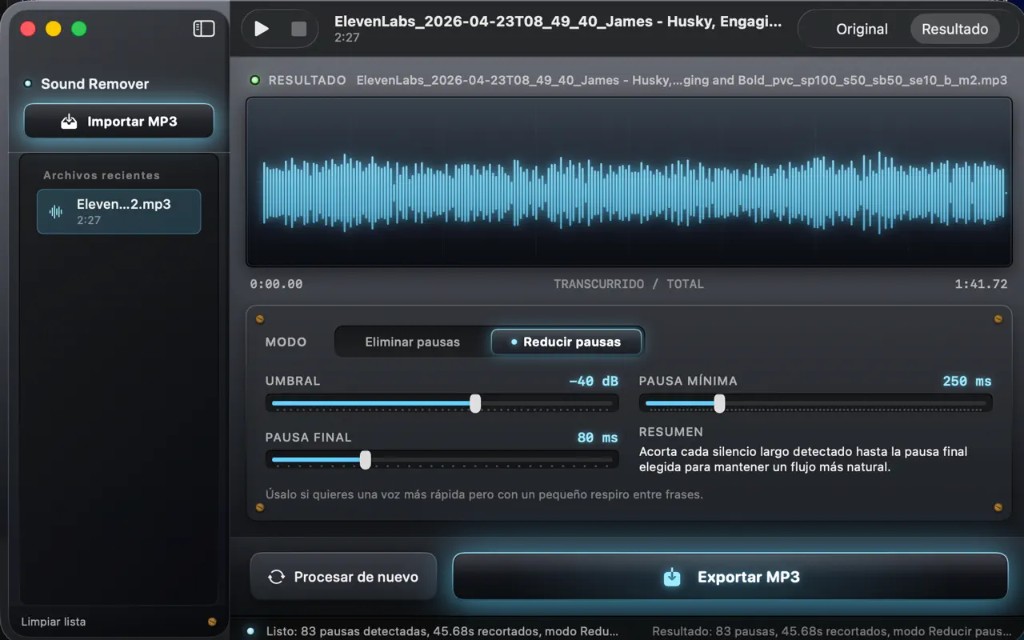
Audio Silence Remover is a macOS app for spoken-word MP3s: import a file, detect long pauses, preview the trimmed waveform, export a cleaned MP3. Also useful for podcasters, voiceover work, and audiobook editing when you want tighter pacing without re-recording.

What it does

  • Import MP3 and scan amplitude against a configurable threshold (dB). Anything below it counts as silence.
  • Remove pauses or reduce pauses to a target length so speech keeps a natural rhythm.
  • Preview original vs result on a waveform before you commit.
  • Export a new MP3 when you are happy with the cut.
  • English and Spanish UI; no data collected (App Store privacy label: the developer does not collect data).

Typical workflow for me: ElevenLabs or voiceover export → trim dead air → drop the MP3 into a short-form edit for TikTok or YouTube.

How it was built

Swift / SwiftUI macOS app with on-device audio processing: read samples, find runs under the threshold, splice. No cloud pipeline, no account, no ML stack for a problem that is just signal math. If you can explain the job in five lines of DSP, you probably do not need a model endpoint.

Visually I went skeuomorphic on purpose: brushed metal, glass panels, controls that look like physical knobs and switches. A nod to the classic Mac OS X utilities I grew up with, the ones that were on the machine when I first started using computers. Felt right for a small single-purpose Mac tool.

Shipped free on the Mac App Store; source is public so others can inspect, fork, or adapt the logic.

App Store work: sandbox signing, macOS 15+ target, localized strings, review cycles.

Screenshot

Main window: skeuomorphic Mac-style UI, recent files, waveform with original/result toggle, pause mode and threshold controls, export.

Audio Silence Remover macOS app: waveform editor with pause removal controls